
Blueprint for GTK
Syntax highlighting for GTK Blueprint files
Details
Installs
- Total 45
- Win 15
- Mac 6
- Linux 24
| Jun 23 | Jun 22 | Jun 21 | Jun 20 | Jun 19 | Jun 18 | Jun 17 | Jun 16 | Jun 15 | Jun 14 | Jun 13 | Jun 12 | Jun 11 | Jun 10 | Jun 9 | Jun 8 | Jun 7 | Jun 6 | Jun 5 | Jun 4 | Jun 3 | Jun 2 | Jun 1 | May 31 | May 30 | May 29 | May 28 | May 27 | May 26 | May 25 | May 24 | May 23 | May 22 | May 21 | May 20 | May 19 | May 18 | May 17 | May 16 | May 15 | May 14 | May 13 | May 12 | May 11 | May 10 | |
|---|---|---|---|---|---|---|---|---|---|---|---|---|---|---|---|---|---|---|---|---|---|---|---|---|---|---|---|---|---|---|---|---|---|---|---|---|---|---|---|---|---|---|---|---|---|
| Windows | 0 | 0 | 0 | 0 | 0 | 0 | 0 | 0 | 0 | 0 | 0 | 0 | 0 | 0 | 0 | 0 | 0 | 0 | 0 | 0 | 0 | 0 | 0 | 0 | 0 | 0 | 0 | 0 | 0 | 0 | 0 | 0 | 0 | 0 | 0 | 0 | 0 | 0 | 0 | 0 | 0 | 0 | 0 | 0 | 0 |
| Mac | 0 | 0 | 0 | 0 | 0 | 0 | 0 | 0 | 0 | 0 | 0 | 0 | 0 | 0 | 0 | 0 | 0 | 0 | 0 | 0 | 0 | 0 | 0 | 0 | 0 | 0 | 0 | 0 | 0 | 0 | 0 | 0 | 0 | 0 | 0 | 1 | 0 | 0 | 0 | 0 | 0 | 0 | 0 | 0 | 0 |
| Linux | 1 | 0 | 0 | 0 | 0 | 0 | 0 | 1 | 0 | 0 | 0 | 0 | 0 | 0 | 0 | 0 | 0 | 0 | 0 | 0 | 1 | 0 | 0 | 0 | 0 | 0 | 0 | 0 | 0 | 0 | 0 | 0 | 0 | 0 | 0 | 0 | 0 | 0 | 0 | 0 | 0 | 0 | 0 | 0 | 0 |
Readme
- Source
- raw.githubusercontent.com
Syntax highlighting for GTK Blueprint files
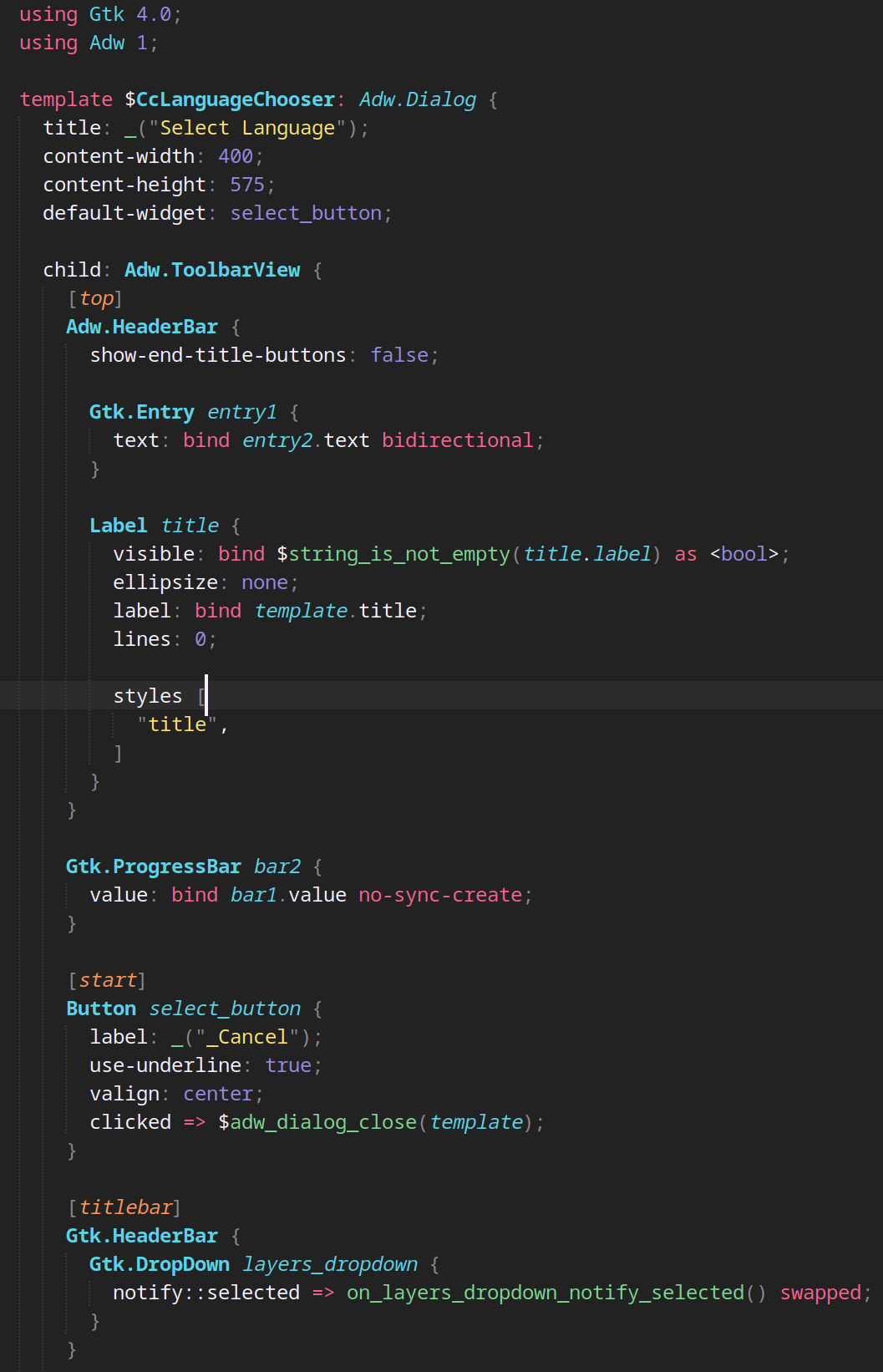
This is a Sublime Text plugin to provide syntax highlighting for Blueprint compiler files, which is a markup language and compiler for GTK 4 user interfaces.
Screenshot
With color scheme Monokai Pro (Filter Spectrum)
Installation
This package is published on https://packagecontrol.io/ so easiest way to install is via Package Control inside Sublime Text: search for “blueprint gtk”.
Manual
Clone the repository inside your Sublime Text “Packages” directory:
git clone https://github.com/nbenitez/blueprint-gtk.git
The “Packages” directory is located at:
- Linux:
~/.config/sublime-text/Packages/ - OS X:
~/Library/Application Support/Sublime Text/Packages/ - Windows:
%APPDATA%\Sublime Text\Packages\
Issues
Report issues at GitHub Issues.
Misc
Original syntax taken from https://github.com/jtojnar/vscode-blueprint/blob/fix-syntax/syntaxes/blueprint.tmGrammar.json and converted to Sublime Text format with https://github.com/IsaacShelton/SublimeSyntaxConvertorFromJSON